Frequently asked questions
Answers about DiaShowMaker, the trial version and the license.
What is DiaShowMaker?
DiaShowMaker is a Windows program that creates a slideshow as an MP4 video from photos and video clips, with transitions, music, intro and outro. It works locally on your computer, without a cloud.
Windows or my browser warns me about the download. What should I do?
The download is not harmful. The warning appears because DiaShowMaker is still new and the installer does not yet carry a publisher name (digital signature); Chrome, Edge and Windows SmartScreen warn about programs they do not know. Here is how to get to the installer anyway. Follow only the steps for your browser, and do not turn off your antivirus or SmartScreen for this.
Google Chrome
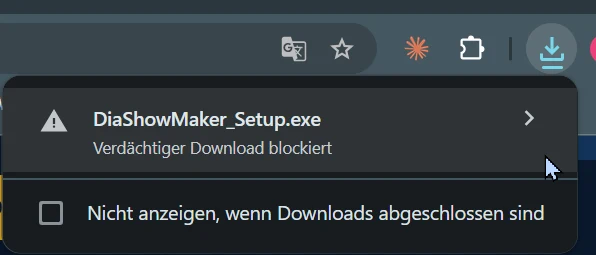
- After you click “Download DiaShowMaker”, the download icon at the top right shows “DiaShowMaker_Setup.exe” with a note that the download was blocked as suspicious.
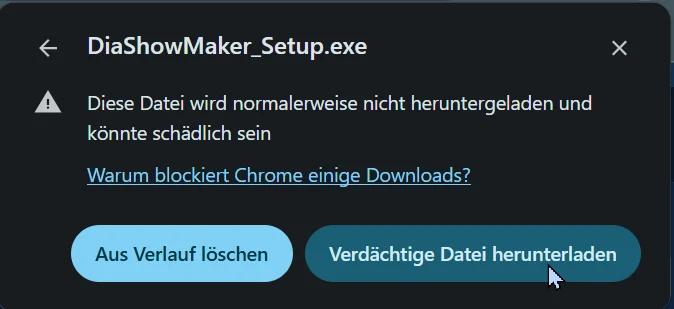
- Click the entry (arrow on the right). Chrome says the file is not commonly downloaded and could be harmful. Choose the button to download the suspicious file anyway (not the one that deletes it from the history).
- The download history then shows the file as finished. Use the folder icon to open the download folder and start the file (see “Windows at start”).
Microsoft Edge
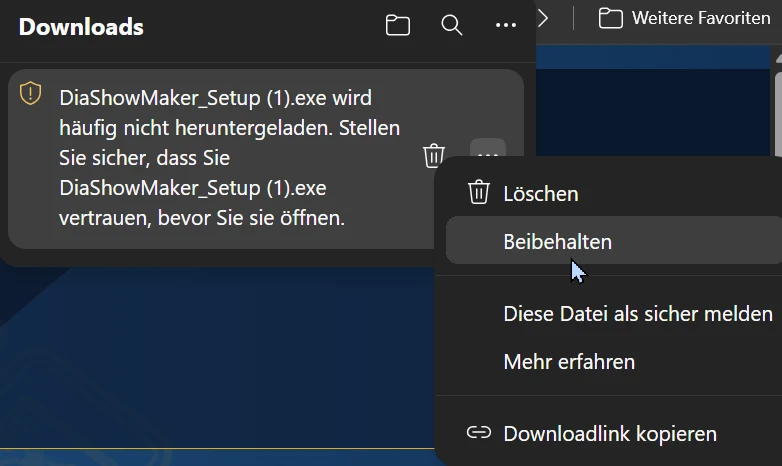
- The download window says that DiaShowMaker_Setup.exe is not commonly downloaded. Click “Show more”.
- Click the three dots “…” next to the entry and choose “Keep”.
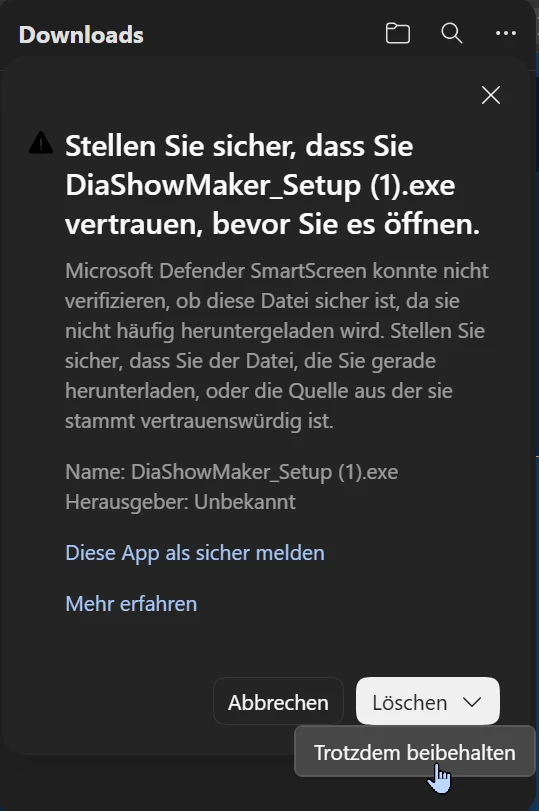
- Microsoft Defender SmartScreen shows “Publisher: Unknown”. Click the arrow next to “Delete” and choose “Keep anyway”. Then start the file (see “Windows at start”).
Windows at start (all browsers)
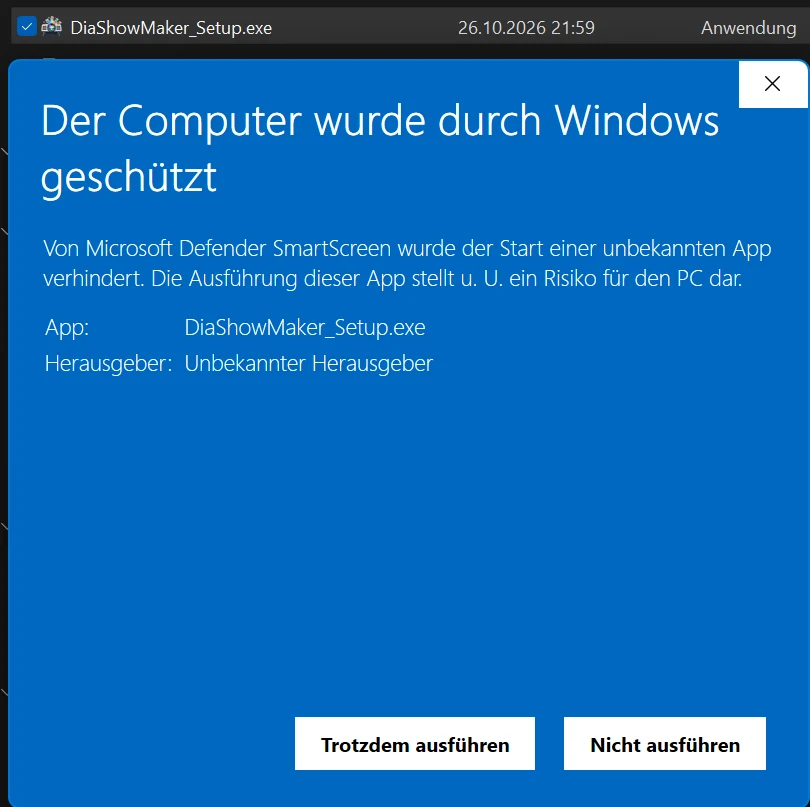
- Double-click DiaShowMaker_Setup.exe. Windows shows “Windows protected your PC” with “Publisher: Unknown publisher”. Click “More info”, then “Run anyway”.
- The installer then opens as usual (language selection, license agreement, installation).
If you like, you can check that the file is unchanged: run Get-FileHash "Path\DiaShowMaker_Setup.exe" -Algorithm SHA256 in PowerShell. The value for version 2.0.2 is:
09377939CD9A5D01706B1C505DC85464A93E7752B7A1F624F2F9298AEF633C08My antivirus reports DiaShowMaker or blocks saving. What should I do?
DiaShowMaker is new and not yet digitally signed. Some antivirus programs, for example Norton, treat new unsigned programs cautiously at first or report them as unknown. A message such as “Win64:Evo-gen” is a heuristic assessment, not a statement about specific malicious code. You can check that your download is unchanged with the SHA-256 checksum (see the instructions on download warnings). If the ransomware protection of your antivirus or Windows controlled folder access blocks saving into a protected folder, add DiaShowMaker.exe as allowed in the app permissions (in Norton with a German interface: Sicherheit > Erweitert > Ransomware-Schutz > App-Berechtigungen) or choose a different output folder.
What is the difference between the trial version and the full version?
The trial version runs for 30 days from the first start. It adds a watermark to the video, allows up to 10 files per show and saves the sound as MP3; sound from video clips and M4A or AAC music are not possible. With a license key these limits no longer apply, and the sound is saved as AAC. A side-by-side comparison is on the pricing page.
What happens after the 30 days?
At startup a notice window appears with the buttons “Buy license”, “Enter license key…” and “Exit”. You can create videos again once a valid license key has been entered.
Why does the trial period keep running after an uninstall?
The start of the trial period is stored on first launch in the Windows registry of your user account (HKCU\Software\DiaShowMaker\Trial). The entry remains after an uninstall, so reinstalling does not extend the trial. No data is transmitted. The trial version runs without activation.
Why does the trial version only have MP3 sound?
The trial version saves sound as MP3 (128 kbit/s, 48 kHz, stereo) using a built-in encoder. The full version uses the encoder built into Windows for AAC. AAC sound, M4A and AAC music files and sound from video clips are therefore only available in the full version.
What do I need to know about Windows N or KN?
The AAC encoder is missing on these Windows editions. DiaShowMaker then shows a notice: the administrator should install the Media Feature Pack from Microsoft. This only affects the full version with AAC sound; the MP3 output of the trial version does not need it.
Do I need an internet connection?
Not for creating videos: it runs entirely locally, and your photos and videos are not uploaded. You need an internet connection once, when you activate your license key; after that the full version also runs without internet. If the program has a connection, it checks about every 30 days in the background whether the license is still valid; without a connection it simply keeps running. The trial version needs no internet at all.
Which file formats are supported?
Images: JPEG, PNG, WebP, BMP, TIFF, GIF and AVIF (HEIC and HEIF are not supported). Video clips: MP4, MOV, M4V, MKV, AVI, WebM, WMV, 3GP, MTS and M2TS. The output is an MP4 file with H.264 video. Music: MP3, WAV, FLAC and OGG, plus M4A and AAC in the full version. For video clips with sound, AC-3 and E-AC-3 are read; DTS, TrueHD and similar audio formats are not decoded, so the clip plays without sound. HEVC (H.265) clips are read with FFmpeg's decoder; no patent licence for HEVC is included (see section 3.6 of the licence terms).
Which languages are available?
The interface is available in German, English, French, Spanish, Portuguese (Brazil), Italian, Polish, Russian and Dutch. By default it follows the Windows language. In the program you can change it at the top via “Language”; the change applies after a restart.
On how many devices may I use the full version?
One license covers one person and up to two devices. Activated devices are counted; the portable version also counts as a device. In the license window (“License…”) you can see your activated devices and release devices, for example when you use a new computer.
How do I receive my license key?
After the purchase we automatically send the key to the email address you gave when paying, usually within a few minutes. Please also check your spam folder. If nothing arrives, write to us at This email address is being protected from spambots. You need JavaScript enabled to view it. .
How do I activate the license?
In the program click “License…” at the top, paste the key and choose “Activate”. You need an internet connection once for this. You can load the license file that came with the email via “Import License File…”; it only fills the key field, then you choose “Activate”. After activation the full version also runs offline.
What is transmitted during activation?
The program sends, encrypted (HTTPS), your license key, a check value of your device (a hash of the Windows machine identifier), the name of your computer, the program version and the product identifier to our server. The server technically sees your IP address. Photos, videos, music and usage data are not transmitted. More is in the privacy policy.
Do I have to be online regularly after activation?
No. If the program has an internet connection, it checks about every 30 days at start-up, in the background, whether the license is still valid. Without a connection it keeps running and tries again later. Only if the license key has been blocked will a notice appear.
I have a new computer or reinstalled Windows. How do I keep using my license?
Start DiaShowMaker, open “License…”, paste the key and choose “Activate”. If two devices are already activated, choose “Show devices”, select the old device and choose “Release selected”; after that you can activate. After a fresh installation of Windows the computer counts as a new device, so you should release the old one. If that does not work, write to us at This email address is being protected from spambots. You need JavaScript enabled to view it. and give your license ID.
Activation fails. What can I do?
First check the internet connection, the date and time of the computer and whether a firewall, proxy or antivirus blocks the connection to www.diashowmaker.com. The program shows a message with the reason. If two devices are already activated, release one (see the question about a new computer). If that does not help, write to us at This email address is being protected from spambots. You need JavaScript enabled to view it. with your license ID and the message.
What happens if my license is blocked?
A block occurs only upon withdrawal, full refund or chargeback of the purchase, or for good cause (see EULA section 12). Partial refunds do not block. The program learns of it at the next activation or license check, at the latest about 30 days after the block. After that the functions of the full version are no longer available. Your videos and files are not affected.
What does “Remove License” do?
The program removes the key and the activation from this computer and offers to release the device on our side as well (internet required). This frees a slot for another device.
May I pass on the installer?
Yes. You may pass on the unmodified installer free of charge to friends, relatives and others. Please do not pass on your personal license key.
Which third-party components does DiaShowMaker contain?
To create videos, DiaShowMaker calls FFmpeg 9.0.2 (own build) with x264 as stand-alone programs (GPL). For the MP3 output of the trial version, LAME 3.100 (LGPL) is built into FFmpeg. License texts are in the “licenses” folder of the installation. You can find the source code on the source code page; it is also included with the installer (optional component).
What about updates?
Your license covers all updates of version 2.x. A future major version may require a new license.
How do I send a video via messenger?
Messengers limit the file size. For this case DiaShowMaker can create video segments that are small enough and are sent one after the other.
What data is in the license key?
The key contains your name and email address in encoded form, plus the license number and issue date; the license file shows name and email in plain text. Please do not share either publicly. More in the privacy policy. During activation the program also transmits the license key, a check value of your device, the name of the computer and the program version to our server. Photos, videos and music stay with you. Details are in the privacy policy.
Which operating systems does DiaShowMaker run on?
On Windows 10 and Windows 11 (64-bit).
Can I get my money back?
You will find information under withdrawal and refund policy. Please try the free trial version before buying. If the purchase is withdrawn from or fully refunded, the license key is blocked; the program learns of it at the next license check, at the latest about 30 days later.
More questions? Contact support